
Powerful SEO Tips and Tricks to Boost Traffic
We may earn money or products from the companies mentioned in this post.
Updated on the 28 July 2025
A heartfelt welcome to my website—I’m so glad you’re here!
If you’re trying to grow your blog, boost your website traffic, or build a successful online business, you’re in the right place.
This article is packed with Powerful SEO Tips and Tricks to Boost Traffic—designed to help you rank higher in search results and bring in more organic visitors.
So, grab your coffee (or tea!), and let’s jump straight into the strategies that will help your content get seen by more people—starting today.
Powerful SEO Tips and Tricks
Have you recently launched a fantastic website?
That’s great—but here’s the thing: it won’t matter if no one ever sees it.
When I first started out, I had no idea what SEO was or how much it would affect my visibility on Google. I couldn’t understand why my articles weren’t showing up, even though they were completely original.
Then I came across an article that explained the power of SEO. I applied what I learned, and slowly but surely, my content began to rank. That moment changed everything.
I’ve now put together some proven SEO strategies and methods to help your site get noticed and rise in the search results.
There are many reasons people build websites.
You might be launching a new product, sharing your personal story, or blogging about something you’re passionate about.
But none of that matters if no one visits your site.
That’s where search engine optimization (SEO) comes in. It helps your website show up when people are searching for what you offer—whether you’re using shared hosting, a VPS, or a dedicated server.
SEO won’t guarantee you the top spot overnight, but these practical techniques will make it easier for search engines—and your future visitors—to find your site.
Let’s get started with the tips that can help your content stand out.
Create a Professionally Designed Website
Once you’ve got the basics of SEO in place, the next step is making sure your website looks and functions like a professional one.
If your site is new, large, or packed with multimedia content like videos or audio, consider generating a sitemap.
This simple file helps search engines understand how your site is structured so they can crawl and index your pages more efficiently.
Google even offers its own sitemap generator, and Bing supports them too. If you want your site to appear in Google News, having a sitemap isn’t just helpful—it’s required.
But don’t stop there. Your website should also encourage visitors to engage with your content. Make it easy for people to navigate, leave comments, and share what they find helpful.
A clean design, clear calls to action, and useful internal links all help create a positive user experience—which search engines love too.
Selling goods?
If you’re selling products—whether they’re physical items, digital downloads, or something in between—your website needs more than just descriptions.
Optimized product images are a must.
Clear, high-quality images help build trust and give visitors a better idea of what they’re buying. Make sure your photos are well-lit, show different angles, and highlight key features.
Also, don’t forget to optimize the images for web—that means compressing the file size for faster loading, using descriptive file names, and adding alt text for SEO.
Great visuals don’t just make your site look good—they help boost conversions and improve your search rankings too.

Do you have a blog?
A well-structured website paired with engaging content doesn’t just help with SEO—it keeps your visitors around longer.
When people enjoy their experience on your site, they’re more likely to click through, share your posts, and come back for more.
This kind of activity sends positive signals to search engines. It tells them your content is valuable and relevant, which can lead to higher rankings over time.
So while optimizing for Google is important, don’t forget—you’re writing for real people too.
Make sure your site looks great, loads quickly, and makes it easy for readers to find what they’re looking for. That’s when your SEO efforts really start to pay off.
Concentrate on a Specific Topic
Search engines, like Google, are designed to guide users to the most trustworthy and accurate information available. They want to send people to websites that really know what they’re talking about.
That’s why, if you’re a specialist—or even just passionate and well-informed—in a specific niche, your website should clearly reflect that expertise.
Show your knowledge through well-written blog posts, in-depth guides, or product reviews that provide real value.
The more your site demonstrates authority, the more likely it is to earn higher rankings and the trust of both search engines and readers.
In short, lean into what you know—and make it easy for others to see you’re the real deal.

Do you like to share your recipes with the world?
If so, your website should clearly reflect that focus. Love food? Make it the star. Your audience—and Google—will thank you for sticking to one strong topic.
Mixing recipes with unrelated content (like metallurgy or tech reviews) can confuse your visitors and weaken your authority in any single area.
The more focused your content, the easier it is for search engines to understand what your site is about—and who it’s for.
So if you’re a food blogger, make every page count toward building that theme. The same goes for any niche. Whether you’re into photography, parenting, or baking, clarity and consistency win in SEO.
Specificity Is Also Essential
General websites tend to get lost in the crowd. But when you’re specific, you stand out. For example, if you’re a fisherman, focus your content on fly fishing rather than deep-sea fishing.
This helps you connect with a more defined audience who are searching for exactly what you offer.
The more specific your niche, the better you can tailor your content, keywords, and product recommendations. And the better Google can match your site with the right searches.
Lean into your strengths and showcase your expertise—that’s what builds trust and authority online.
What Are Keywords?
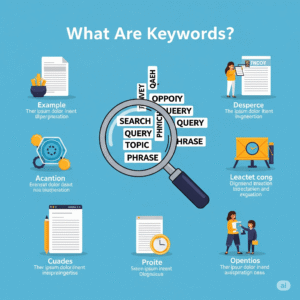
Keywords are the words and phrases people type into Google to find what they’re looking for. Think of them as the bridge that connects your content to your ideal audience.
To use keywords effectively, they need to be placed naturally throughout your site—in your page titles, headings, URLs, meta descriptions, and image alt tags. You don’t need to overthink it.
If your site is built with a website builder or WordPress, there are easy tools to help with this.
Just make sure your keywords reflect what your visitors are actually searching for.
It’s not about stuffing words everywhere—it’s about using them with intention.
Optimise Your Keywords to Fit People’s Queries
Good SEO means understanding how real people search online. If you sell handmade scarves, your keywords should match how someone might search for them.
Basic terms like “scarf” and “knitting” are a start, but they’re also highly competitive.
That’s where long-tail keywords come in—more specific phrases that match detailed searches, like “best hand-knitted Pokémon scarves”.
These kinds of keywords can bring in more targeted traffic—and people who are ready to engage or buy.
Google’s Keyword Planner is a great tool to find high-performing search terms. Just be careful not to go too niche—choose keywords people are actually using.
Produce Consistently High-Quality Content
Google doesn’t just care about what you say—it cares about how you say it. Your content should be original, helpful, and focused on answering real questions.
If your website is about car engines, write posts that help your readers solve problems or learn something new—like “5 Signs Your Transmission Needs Repair” or “Common Carburetor Cleaning Mistakes.”
Fresh, informative content gives visitors a reason to stick around, and it gives search engines a reason to boost your rankings.
Avoid copying content from other websites—Google penalizes duplicate content. Instead, focus on creating your own voice and sharing your own knowledge.
Focus on High-Quality Material
Great content is the heart of SEO—but consistency is key. Keep your website fresh with regular updates.
That might mean new blog posts, updated product listings, fresh images, or improved descriptions.
Visitors want a reason to return—and share. And when people start sharing your content on platforms like Facebook, Instagram, or Twitter, search engines take notice.
External links from trusted sources (called backlinks) are one of the strongest signals to Google that your site is worth ranking.
You don’t need a shoutout from the New York Times to get started—just focus on creating valuable content that people genuinely want to link to and share.
Showcase your knowledge, update your site often, and provide value with every post. Over time, you’ll build momentum—and search engines will take notice.
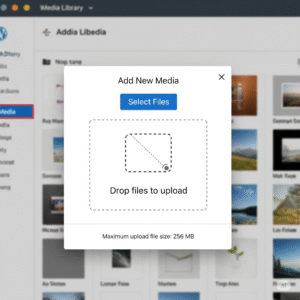
Uploading a Picture to WordPress
Adding images to your WordPress posts or pages is simple, once you get the hang of it. Start by logging into your WordPress dashboard.
From the left-hand menu, choose either Posts or Pages, depending on where you want the image to go.
Click Edit on the post or page, then place your cursor in the spot where you want the image to appear. Next, click the Add Media button.
You can upload a new image from your computer or choose one that’s already in your media library. Select the image, click Insert into post, and you’re all set.
Once you publish the page or post, the image will be live on your site.
Optimise Your Images
Images do more than make your site look nice—they help explain your message and keep readers engaged. But for them to work well, they need to be properly optimized.
Start by keeping file sizes small. Aim for under 1MB per image, or even smaller if your site is image-heavy. The ideal size for most web images is 1920 x 1080 pixels, saved as JPG or WEBP for faster loading.
Search engines can’t “see” images, so it’s important to add alt text—a short description that tells search engines what the image is about.
Keep it under 125 characters and be descriptive. In WordPress, there’s a field for this when you upload an image, but you can also add it manually using HTML.
These small steps help both your visitors and search engines understand your content better.

Google PageSpeed Insights
Page speed isn’t just about user experience—it also impacts your rankings. Google uses tools like PageSpeed Insights to measure how fast your site loads and uses that data when deciding where to place you in search results.
A good rule of thumb: if your site takes longer than three seconds to load, you’re probably losing visitors—especially mobile users.
Tools like Google PageSpeed Insights or Pingdom will show you what’s slowing down your site and how to fix it. Common issues include oversized images, bloated scripts, or unused plugins.
If you’re using WordPress, consider removing any unnecessary plugins. You might also try tools like WP Rocket, which can help your site load faster by caching pages and minimizing code.
Create Information-Rich Meta Descriptions
Every page on your site should include a meta description. This short summary appears under your page title in search results and tells users what your content is about.
Meta descriptions are a great place to include your main keyword and encourage clicks. Think of them like mini ads for your content.
Aim for about 150 characters and make sure it clearly explains what someone will learn or gain from visiting your page.
Even though meta descriptions don’t directly affect rankings, they do influence whether someone clicks your link—and that can affect your visibility over time.
Avoid Keyword Stuffing in Meta Descriptions
It’s tempting to cram in as many keywords as possible, but that’s known as keyword stuffing—and search engines don’t like it.
Instead, write your meta descriptions in clear, natural language that accurately reflects what the page is about.
If you’re familiar with HTML, you can place your meta description in the <head> section of each page manually.
But most modern content management systems make this easier.
If you use WordPress, plugins like Yoast SEO or All in One SEO Pack let you add meta descriptions without touching any code.
These tools also guide you to write descriptions that are SEO-friendly and reader-focused.
Address Your URLs
Your URLs matter more than you might think. Search engines do look at the keywords in your site’s web address, just like they do with your on-page content.
If your site uses dynamic URLs—those that end with random numbers or letters—it’s time for an upgrade. Switching to static URLs that include keywords helps both users and search engines understand what the page is about.
For example:
Instead of http://yoursite.com/post?id=1234, go with something like http://yoursite.com/smart-cars.
Keep your URLs short, descriptive, and easy to read. Use hyphens to separate words instead of squishing them together. Clean, keyword-rich URLs are another small step that makes a big difference.
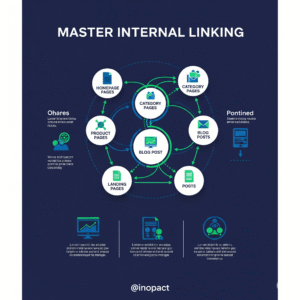
Master Internal Linking
While backlinks (links from other websites to yours) are valuable, you don’t have direct control over who links to you. What you can control is your internal linking strategy.
Internal links help guide your readers from one page to another within your site. For example, if you’re writing about car maintenance and mention spark plugs, link that phrase to a related post like “How to Replace Your Spark Plugs.”
Just make sure your links are helpful and used in moderation. Avoid stuffing too many links into a single paragraph, and never link just for the sake of it—search engines can tell when it’s unnatural.
Also, keep your links updated. Broken links not only frustrate readers but can also hurt your SEO. Tools like Dead Link Checker can help you keep things clean and working properly.
These tips are just the beginning. Search engine optimization is a long game, and results don’t happen overnight.
But with patience and consistency, your website will become more visible, more trusted, and more successful over time. Keep going—you’re building something valuable.
Pros
- Increased Organic Traffic
With higher visibility, your site can attract more targeted visitors without paying for ads, which means long-term, sustainable growth. - Improved Search Engine Rankings
Applying SEO best practices—like keyword targeting, meta descriptions, and optimized content—helps your site rank higher in Google and Bing search results. - Better User Experience
Optimizing images, improving page speed, and using clear internal links creates a smoother experience for your visitors—keeping them engaged longer. - More Credibility and Trust
A well-optimized, professional-looking website builds trust. When your content is helpful and your pages load quickly, people are more likely to see you as a reliable source. - Cost-Effective Marketing Strategy
Most SEO strategies are low-cost or free—especially when using tools like Google Search Console, Keyword Planner, and WordPress plugins like Yoast SEO.
Cons
- Takes Time to See Results
SEO is not instant. It often takes months of consistent effort before you see significant improvements in traffic or rankings. - Ongoing Maintenance Required
You’ll need to regularly update content, fix broken links, monitor page speed, and stay on top of algorithm updates to maintain your rankings. - High Competition in Popular Niches
Some keywords are very competitive, making it harder for new or smaller websites to rank without strong content and backlinks. - Technical Knowledge May Be Needed
While tools like WordPress simplify SEO, some strategies—like editing HTML, optimizing page speed, or customizing URLs—can be tricky for beginners. - Over-Optimization Can Backfire
Keyword stuffing, using too many links, or writing for algorithms instead of real people can hurt your SEO performance rather than help it.
FAQ
Q. What’s the one thing you need to consider concerning search engine optimisation?
A. The “Golden Rule” of SEO is understanding your customers’ wants.
Build an SEO experience that satisfies those aims, from the search result listing to the visitor’s initial impression to her ability to fast and easily access the stuff she’s looking for.
Q. What are the five most significant concepts in search engine optimisation?
A. Crucial considerations include, among others:
- The joys of mobile computing.
- Compressing images.
- Textual material containing helpful information.
- Technical efficiency and site speed.
Q: How long does it take to see results from SEO?
A: SEO isn’t instant—it’s a long-term strategy. You might start seeing small improvements in a few weeks, but meaningful traffic boosts often take 3 to 6 months or more. It depends on your niche, competition, and how consistently you apply SEO best practices.
Q: Do I need to blog regularly for SEO to work?
A: Yes, consistency helps. Regularly publishing high-quality, helpful content signals to search engines that your site is active and valuable. It also gives you more opportunities to target new keywords and attract visitors from different searches.
Q: Can I do SEO without spending money?
A: Definitely. Many powerful SEO strategies—like writing quality content, optimizing images, using keywords wisely, and internal linking—are completely free. Tools like Google Search Console and Ubersuggest can also help without costing a thing.
Summary
Boosting organic traffic starts with creating high-quality content and optimizing your existing blog posts.
Focus on targeting the right keywords and filling content gaps to grow your traffic—without paying for it.
With search competition getting tougher, strong SEO strategies are more important than ever.
Keep checking back—this site is regularly updated with fresh, helpful SEO tips!
Want to Start Your Online Business the Easy Way?
You may also be interested in what Wealthy Affiliate offers—a free domain name, WordPress website, support, and beginner-friendly training to help you get started fast.
No credit card needed. No pressure. Just real tools and training to launch your online journey with confidence.
👉 Check it out now—click here and start for free!
I hope the Powerful SEO Tips and Tricks to Boost Traffic was helpful.
Thank you for reading, and we hope you find the insights valuable and thought-provoking.
I would much appreciate it if you could kindly leave your comments and questions below.
Thank You For Stopping By Once More
Till The Next Time
Elke
I am also in the affiliate marketing business. I started my journey 5 years ago and today I am the owner of 4 successful websites. According to my experience, the niche of your website and the SEO research and implementation are the 2 main factors in order to rank your website. I am using the SEO “Jaaxy” and it provides a decent amount of information. I totally agree with you that the page title/headline and the optimized images play a great role in increasing your SEO score. YOu have provided some of the points which are new to me and totally make sense, I will sure try them out and see their result.
Thank you for such an informative post.
Thank You for your comment, Hari,
Yes, SEO, title/headline, and your images’ optimisation are critical. If one of those things is incorrect, no one will find our page/post because it will not be ranked on Google. We also need to make sure that our website loads fast. No one wants to wait nowadays. I am glad that you liked my article. I am always trying to find valuable content people can benefit from.
Elke
You have explained everything well here and thank you for the text and advice. Although I have been doing this for months, it is very important for me to remember everything I went through in training. Honestly it seemed to me that SEO optimization is very difficult but it really isn’t.
Thank you for your comment, Bojana,
Yes, SEO can be learned and does not have to be complicated. It is a critical point to remember when writing.
I have been using the Headline Studio. to help me with my headings and it also gives you an SEO score.
This may also help you.
Thanks again
Elke
Doing SEO is such an important part of your blog or website if you want to be found by the search engines. Without SEO, search engines will not find your site, and therefore you will not rank and thus no traffic. So if you want to have sales and conversion, you need traffic and therefore SEO.
These powerful tips for doing SEO will help anybody that is in need of improving the SEO practices that they use.
Thank You for your comment, Line,
Yes, SEO is essential, and I found a new tool to help it called Headline Studio. It gives you ideas on how to write a good headline and gives you an SEO score. I have been using it a lot, and it may help you too.
Thanks again
Elke